PCMCS
There are two options to connect to PCMCS applications using the EPMware Agent. The EPMware agent can either be installed on the EPMware supplied cloud server on AWS or on a customer supplied server. If an EPMWARE supplied cloud server is used then no action is required. However, it is possible that Oracle may either block communication initiated from the AWS server and therefore customers may choose to use their own server to communicate with the PCMCS application.
EPMAUTOMATE
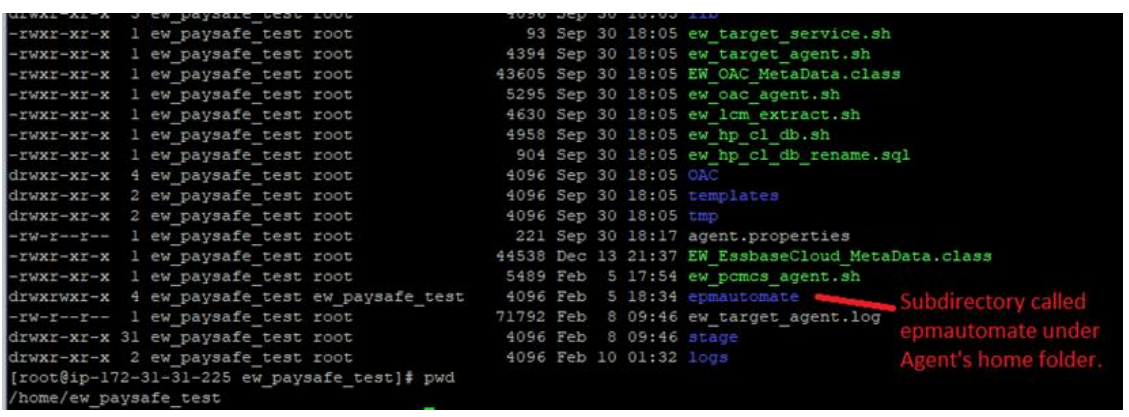
Create a subdirectory called “epmautomate” as shown below under the Agent’s home directory.
For example, in this case the agent's home directory is “home/ew_paysafe_test”
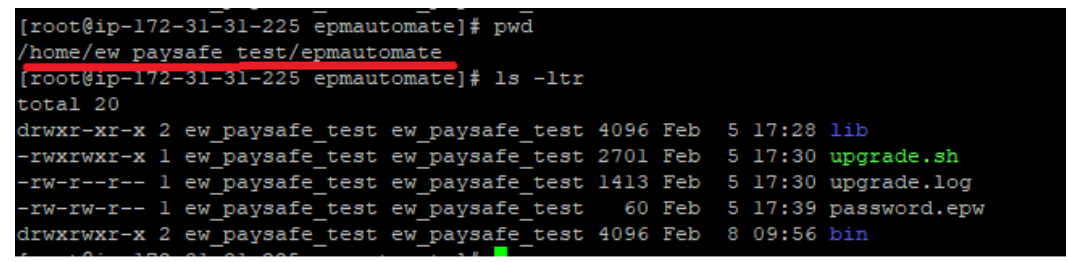
The directory contents of the EPMAUTOMATE utility should look like the following:
Tasks performed by the Agent :
The EPMware Agent will communicate with the EPMware application and check every 30 seconds to see if there are any deployments in the queue. Any pending deployments will be processed and return a status and log details back to the EPMware application. The EPMware Agent will use the EPMAUTOMATE utility to deploy metadata to the PCMCS application. Therefore, the EPMAUTOMATE utility will need to be pre-installed at a specific location as mentioned below.
Agent Maintenance
There are two types of updates that may be periodically needed for the EPMware agent.
- The EPMware agent is updated. In this case EPMware will communicate this in the monthly release email.
- Oracle updates the EPMAUTOMATE utility. The client will need to update the EPMAUTOMATE utility in their environment. The utility can be easily updated by issuing the “epmautomate upgrade” command.
Test connectivity to PCMCS application using EPMAUTOMATE
Perform the following steps after installing the epmautomate utility under the EPMware agent directory to ensure EPMAUTOMATE is able to connect to the PCMCS application successfully.
Navigate to the epmautomate/bin folder and issue the command as shown below:
./epmautomate login <PCMCS_username> <password> <PCMCS App URL>
For Example
Example
./epmautomate login svc_ew_user welcome123 https://pcmcs-testa123456.epm.em3.oraclecloud.com
The Command should provide a “Login successful” message back to the prompt.
If the epmautomate utility needs an upgrade then it will show the following message:
Note: A new version of EPM Automate is available. You can use "upgrade" command to install.
Upgrade EPMAUTOMATE utility
EPMAUTOMATE utility can easily be upgraded using the commands shown below.
For more details, please refer to Oracle’s standard documentation.